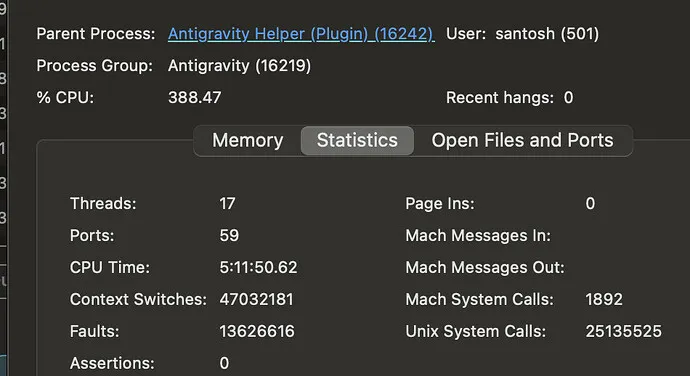
Your Antigravity app freezes after a few prompts and the language server spikes RAM on Windows x64. Projects with very large source files and a root level workspace trigger heavy indexing, heat, and eventual hangs.
Antigravity freezes with language server high memory on Windows x64
When opening a large project at the root level, Antigravity’s language server rapidly consumes memory and the app becomes unresponsive. Users reported files over one thousand lines, device heat, and lockups that started after an update.
Solution Overview
Aspect
Detail
Aspect
Detail
Root Cause
The language server scans and indexes very large files and the entire root workspace which exhausts RAM on Windows x64
Primary Fix
Split giant source files into smaller modules and open only a focused subfolder so the language server indexes less content
Complexity
Medium
Estimated Time
30 to 90 minutes
For a Windows specific checklist including memory and thermal controls, see our Windows x64 memory guide.
Fix language server memory spikes by modularizing large source files
Step by Step Solution
Step 1. Identify oversized files
Open your editor or IDE and sort files by line count or use code outline to spot files exceeding several hundred lines.
Target anything near or above one thousand lines first since these cause heavy parsing and symbol indexing.
Step 2. Refactor into modules
Break long files into cohesive modules and packages. Keep files focused on a single responsibility.
Many users saw instant relief by working in a narrower subfolder rather than the repository root.
Rollback or update Antigravity
If the issue started immediately after an update, install an earlier stable build or update to the latest patch if one is available.
Increase virtual memory on Windows
Set virtual memory to be managed automatically or raise the size to prevent out of memory conditions. See Microsoft guidance on virtual memory: Manage virtual memory.
Temporarily disable heavy code intelligence
Turn off features like deep semantic analysis code lenses and symbol search while you refactor files.
Close other memory hungry apps
Browsers with many tabs and containerized runtimes can starve the language server.
If your issue coincides with backend load or connection problems, see our tips on handling server traffic errors.
Troubleshooting Tips
Check Task Manager for a single language server process ballooning memory. If it does, you still have oversized files or too broad a workspace.
Remove large binary artifacts from source folders. Keep images datasets and archives outside the workspace or ignored.
Clear the app cache then relaunch.
Confirm antivirus is not scanning the workspace aggressively. Add safe exclusions if needed.
Test in a clean profile or a new workspace to rule out extension conflicts.
For background on why editors spike memory while parsing code indexes and symbols, see the Language Server Protocol overview: Language Server Protocol.
Best Practices
Keep source files short and focused. Aim for a few hundred lines per file and extract helpers into libraries.
Use project subfolders to work on specific components rather than the monorepo root.
Maintain ignore patterns for build outputs dependencies caches and logs.
Document module boundaries to encourage ongoing modular design.
Adopt code review checks or automated lint rules that flag oversized files.
Final Thought
The hang was caused by the language server doing heavy work on a very large workspace and oversized files. By modularizing code and narrowing the workspace, you reduce indexing pressure, cool the device, and keep Antigravity responsive.
We use cookies to ensure that we give you the best experience on our website. If you continue to use this site we will assume that you are happy with it.