You tried to run serious analysis and the model suddenly stopped thinking beyond a few paragraphs. The session cuts off, long tasks stall, and after about an hour you hit a long cooldown.
Gemini Ultra thinking length capped at 1,024 tokens and quotas slashed
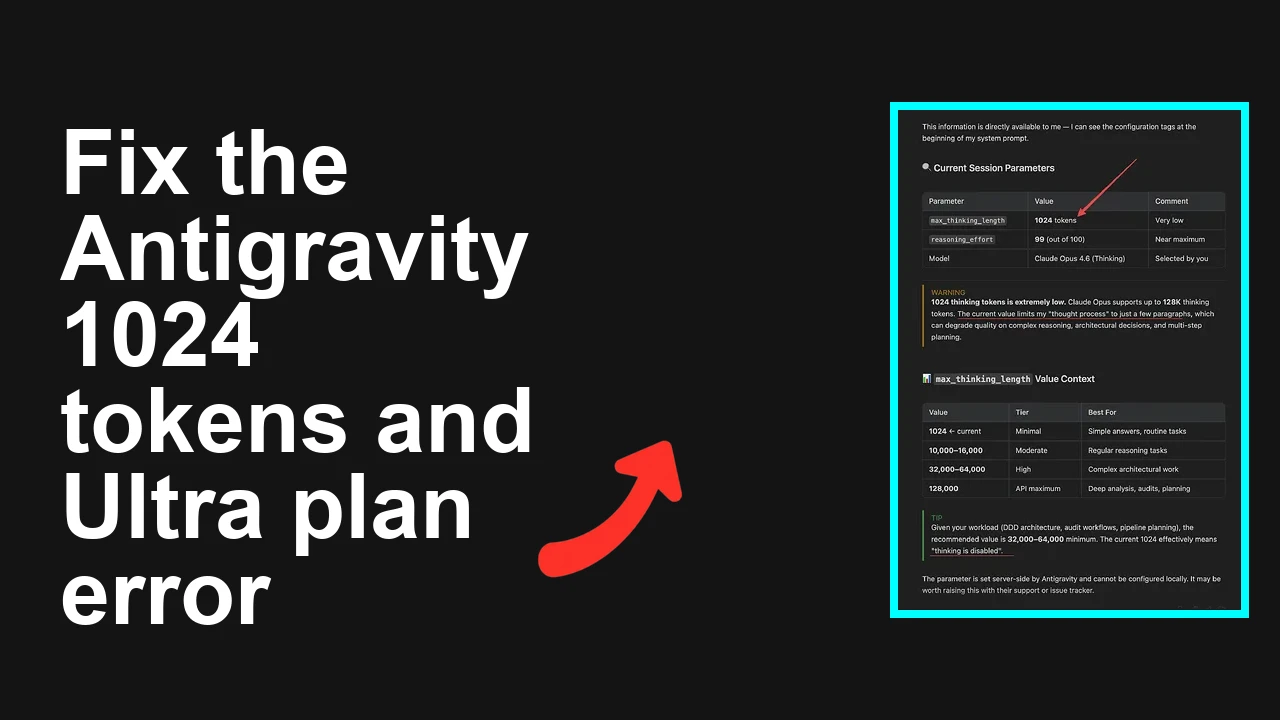
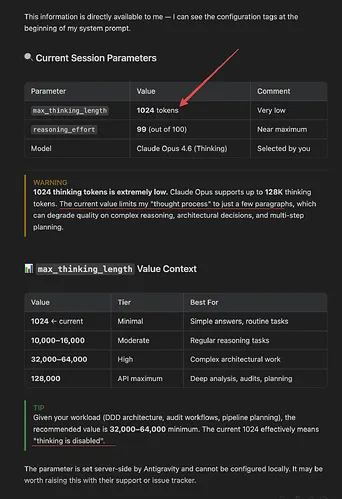
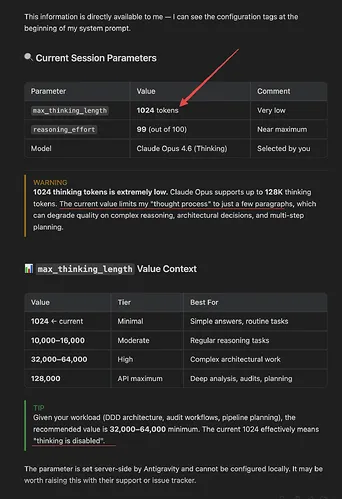
Developers report the server now enforces a hidden cap on internal reasoning called max thinking length at 1,024 tokens. Symptoms include the model refusing to meaningfully analyze longer inputs, severe quality drops on complex tasks, a one hour usable window followed by about four hours of cooldown, and documentation quietly shifting from “no weekly limits” to “highest weekly rate limits.”
If you are seeing professional workflows fail with what used to work, you are affected.
Aspect
Detail
Root Cause
Server side enforcement of a 1,024 token internal thinking cap plus tighter rate limits causing early truncation and cooldowns
Primary Fix
Split workloads with a planner executor pipeline and map reduce summarization to keep each call inside the enforced window or migrate to a model tier with higher effective thinking budget
Complexity
Medium
Estimated Time
45 to 90 minutes
Immediate mitigation that restores usable output quality
Step by Step Solution
1. Confirm you are hitting truncation or cooldown
Send a deliberately longer task and check for early stop or a low quality jump.
Note any 429 or quota limit responses and timestamps to see the one hour on four hours off pattern.
Bash
export GOOGLE_API_KEY="YOUR_KEY_HERE"
Python
pip install google-generativeai tiktoken
Python
import google.generativeai as genai
import time

genai.configure(api_key=os.environ["GOOGLE_API_KEY"])
model = genai.GenerativeModel("gemini-1.5-pro")

prompt = "Write a rigorous analysis of this 40 paragraph technical spec. Return only the final conclusion and a numbered list of actions."

resp = model.generate_content(
 prompt,
 generation_config={
 "temperature": 0.2,
 "max_output_tokens": 512,
 "candidate_count": 1,
 }
)

print(resp.prompt_feedback)
print(resp.candidates[0].finish_reason)
print(resp.text[:1000])
If you repeatedly see early finish or thin content for complex prompts, proceed with the steps below.
For recurring account side quota failures or odd spikes, check this short diagnostic primer: quota error checklist.
2. Switch to a planner executor pattern to stay under the thinking ceiling
First call plans the work in a compact outline.
Subsequent calls execute each part with minimal context.
Final call merges concise results.
Python
from typing import List
import google.generativeai as genai

genai.configure(api_key=os.environ["GOOGLE_API_KEY"])
model = genai.GenerativeModel("gemini-1.5-pro")

def ask(prompt, sys=None, tokens=512):
 return model.generate_content(
 [{"role": "user", "parts": [prompt]}] if not sys else
 [{"role": "system", "parts": [sys]}, {"role": "user", "parts": [prompt]}],
 generation_config={"temperature": 0.2, "max_output_tokens": tokens, "candidate_count": 1},
 ).text

system_brief = (
 "You are a concise analyst. Do not reveal intermediate reasoning. "
 "Return final answers only in numbered steps or JSON."
)

big_task = "We need a complete gap analysis of the attached spec across security, performance, and compliance."

plan = ask(f"Create a ten item plan of atomic tasks to solve this. Keep each task under 2 sentences.", system_brief)
print("Plan:", plan)

tasks: List[str] = [t.strip() for t in plan.split("\n") if t.strip()]
partials = []
for t in tasks:
 result = ask(f"Execute this task with tight focus:\n{t}\nReturn only the final output.", system_brief, tokens=400)
 partials.append(result)
 time.sleep(1)

summary = ask(
 "Merge the following partial results into a final deliverable. "
 "Use bullet points and a short executive summary.\n\n" + "\n\n".join(partials),
 system_brief,
 tokens=600,
)

print(summary)
This pattern keeps each turn within the enforced thinking and output budgets while preserving quality.
3. Use map reduce summarization for long documents
Map phase summarizes chunks.
Reduce phase merges the summaries.
Keep every call small and focused.
Python
import re

def chunk_text(txt, max_chars=6000):
 # conservative chunking that keeps context under cap
 return re.findall(r'.{1,%d}(?:\s|$)' % max_chars, txt, flags=re.S)

def map_reduce_long_doc(text):
 chunks = chunk_text(text)
 maps = []
 for i, ch in enumerate(chunks, 1):
 maps.append(ask(
 f"Summarize chunk {i} with key findings and action items. Be concise:\n{ch}",
 system_brief, tokens=350
 ))
 return ask(
 "Combine these chunk summaries into one cohesive analysis with no repetition. "
 "Return final recommendations only.\n" + "\n".join(maps),
 system_brief, tokens=600
 )
4. Control tokens aggressively
Lower temperature to reduce rambling.
Cap max output tokens to keep the model inside limits.
Ask for structure that is easy to compress such as numbered lists or JSON.
If your SDK or runtime complains about incompatible versions during this change, see this quick fix note: version mismatch troubleshooting.
5. Add graceful backoff around the new rate limits
Detect 429 and apply exponential backoff with jitter.
Persist job state so runs survive the cooldown window.
Python
import random

def with_backoff(fn, args, *kwargs):
 delay = 2
 for attempt in range(8):
 try:
 return fn(args, *kwargs)
 except Exception as e:
 msg = str(e).lower()
 if "429" in msg or "rate limit" in msg or "quota" in msg:
 sleep_for = delay + random.random()
 print(f"Rate limited. Sleeping {sleep_for:.1f}s")
 time.sleep(sleep_for)
 delay = min(delay * 2, 600)
 else:
 raise
 raise RuntimeError("Repeated rate limits exceeded retry policy")
6. If your workload truly needs larger reasoning windows migrate accordingly
Try a tier or model variant documented to support larger context or thinking budgets.
For highly structured tasks convert reasoning into explicit tool calls or code so the model does less implicit thinking.
Push data aggregation, math, and validation into code or a database query.
Ask the model to only interpret final results and produce an answer.
Compress context before sending to the model
Pre summarize large inputs with a fast pass, then feed the compact digest to the main analysis step.
Switch tasks to batch mode
Accumulate small prompts and process them in a single session while the quota window is open.
Constrain output shape
Ask for JSON, tables, or short bullet lists. Avoid narrative essays that exhaust the small window.
Troubleshooting Tips
Check you are not exceeding max output tokens and that each call is concise.
If quality noses mid session, start a fresh session to reset context length usage.
Monitor 429 and 5xx patterns to tune backoff and job scheduling.
Confirm SDK versions and environment variables after any migration between tiers. For known patterns of plan quota failures, see this guide: quota failure scenarios.
If endpoints or features disappear after account changes, revisit access scopes and seats using this quick checklist: account access fixes.
Best Practices
Design prompts for small focused steps and merge results later.
Keep outputs short and structured to save tokens for actual reasoning.
Cache intermediate results and reuse them across runs.
Add robust backoff and telemetry around every call.
Prefer explicit tool use and code for deterministic tasks to avoid wasting the limited thinking window.
Review plan limits regularly and align workload design with the current quotas.
Final Thought
The enforced 1,024 token thinking window and tougher quotas are real constraints, but they do not have to stall delivery. With a planner executor flow, map reduce summarization, strict token control, and sensible backoff, you can regain reliable quality today, while you evaluate a plan or model that truly fits your workload.
We use cookies to ensure that we give you the best experience on our website. If you continue to use this site we will assume that you are happy with it.